



Best Google Review Management Tools You Should Use in 2026
Table of Contents
If you want potential customers in your area to be able to find your business, then your Google Business Profile will need to be your first point of entry. Local searching plays a significant part in discovery in today’s world. Statistics show that almost 46% of Google searches come from a local angle, and more than 88% of mobile phone users who are searching for a local business will either call or pay you a visit within 24 hours of the search.
The problem is that maintaining the Google Business Profile properly requires ongoing attention. Keeping data current, replying to reviews in time, and handling feedback from customers on one or several business locations can be extremely time-consuming. In order to grow a business, manual management usually proves insufficient.
That's where Google review management tools come in. Using the right tool will allow you to automate the process of collecting reviews, manage feedback from different sources, reply to the comments effectively, and take care of your reputation online. This review covers 12 of the top Google review management tools available in 2026, categorized based on their main features.
Key Takeaways
Google review management systems facilitate centralized monitoring, automate review requests, and speed responses on various platforms.
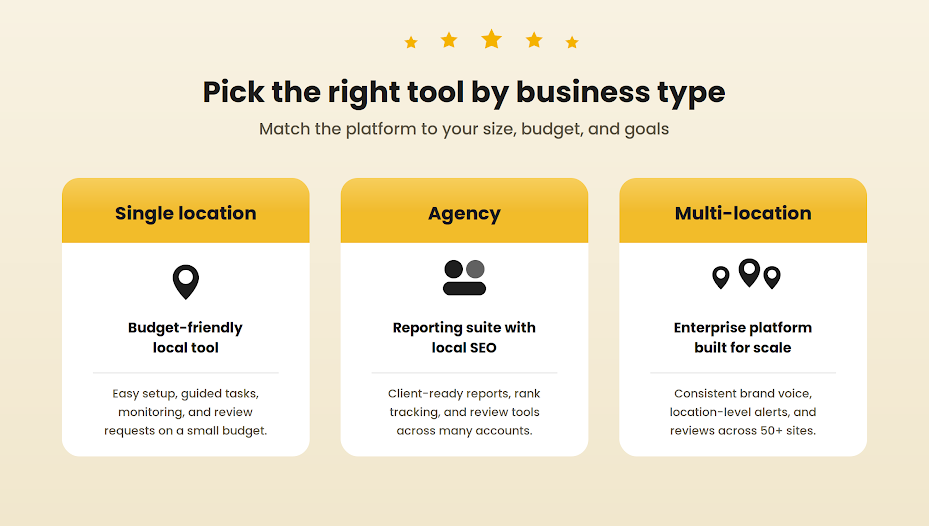
There is no one-size-fits-all solution; it all comes down to whether you are a solo location, an agency, or a multi-location brand.
Most small, localized businesses can use a budget-friendly solution such as Localo or a local SEO software program.
An agency or multi-location company will require features like reports and integration, for which there is justification for spending more.
The software makes it all happen, while the strategy that results in more Google reviews and their subsequent responses is what raises local rankings.
Why Managing Google Reviews Matters
Reviews act as a form of social proof and help determine not only how you perform in terms of ranking but also whether a complete stranger will trust you.
This point is clearly stated by Google itself in its Business Profile guidance: Google says that high-quality reviews can boost your rankings and increase the chances of becoming the consumer’s choice.
In case a business profile is not managed effectively, it acts quite oppositely: Outdated information and an unattended stream of reviews convey an impression of an inactive business, despite all efforts made to promote it. Thus, managing your online reputation through proper management of reviews can lead a potential customer to purchase something.
How We Chose These Tools
To keep this list useful rather than a directory dump, every tool here was assessed against a consistent set of criteria:
An established user base of local businesses in 2026
Native or strong Google Business Profile support
Transparent or clearly stated pricing
Multi-platform review monitoring, not Google alone
Feedback collected on third-party review sites like G2, Capterra, and TrustRadius.
The 12 tools below all clear that bar. This is only because they cater to different requirements, budgets, and needs. So what suits you best?
Quick Comparison: Top 5 Picks at a Glance
Tool | Best for | Starting price (approx) |
Birdeye | Multi-location businesses | $299/mo |
Podium | SMS-first customer messaging | $399/mo |
BrightLocal | Agencies and local SEO | $39/mo |
Localo | Small budgets and beginners | $29/mo |
Semrush | All-in-one SEO plus reviews | $139.95/mo |
The price is approximate and was correct at the time of writing this paper. Please check the website of the provider for current prices before making any decision.
Best 12 All-in-One Review Platforms
1. Birdeye
What it does: Automatic reminders by SMS and email to automate the request process and put all reviews and communications in one place.
Best for: Businesses with multiple locations who need a set of services like review generation and reputation management.
Pro: Strong automation and a genuinely easy review-request flow.
Con: Pricing sits at the higher end for very small businesses.
02. Podium
What it does: Platform for businesses based on SMS messaging, turning it into a review, lead, and payments solution.
Best for: Businesses whose customers respond best to texts.
Pro: Excellent for fast, conversational review requests and lead follow-up.
Con: You pay a premium for the messaging-led approach.
03. Reputation
What it does: It's a reputation management system for enterprises that covers reviews, surveys, social media, and customer experience.
Best for: Large firms that need deep analytics across the full customer journey.
Pro: Powerful insights once configured.
Con: The dashboard is heavy and overkill for small teams.
04. Whitespark
What it does: Citation building, local rank tracking, and review tools built around local search.
Best for: Businesses serious about local SEO and citation accuracy.
Pro: Deep local-search toolset and reliable rank tracking.
Con: Less focused on conversational review requests.
05. BrightLocal
What it does: A local SEO platform with rank tracking, citation creation, review monitoring, and reports for agencies.
Best for: Agencies and local-SEO-minded businesses on a sensible budget.
Pro: Strong reporting and audits at an accessible price.
Con: Review tools are part of a broader suite rather than the main event.
06. Localo
What it does: Helps you improve visibility by doing certain simple steps.
Best for: Small budgets and first-timers.
Pro: Affordable and tells you exactly what to do next.
Con: Lighter on advanced features as you scale.
07. Semrush
What it does: An all-round SEO package with listings and reviews management and keyword and competitor research.
Best for: Teams that want SEO and reviews under one roof.
Pro: Enormous feature set and accurate listing management.
Con: You pay for the whole suite even if you only need part of it.
08. Moz Local
What it does: Distributes and keeps your business data consistent across major aggregators and directories.
Best for: Keeping listings clean and duplicate-free affordably.
Pro: Simple, reliable listing distribution.
Con: Limited review-engagement features.
09. Yext
What it does: Controls your digital facts across a wide publisher network and updates them instantly.
Best for: Brands that need centralized control of listing data at scale.
Pro: Instant updates across many platforms.
Con: Enterprise pricing and complexity.
10. SOCi
What it does: Scalable social media, search, and reviews management across several hundred locations without losing your brand voice.
Best for: Franchises and large multi-location brands.
Pro: Built for serious scale.
Con: More than a single-location business needs.
11. Chatmeter
What it does: Monitors all your locations for any new reviews, sending you an immediate alert.
Best for: Multi-location brands that need fast, location-level monitoring.
Pro: Strong real-time alerting across locations.
Con: Geared to larger operations.
12. Sprout Social
What it does: Advanced social media management and analytics with integrated reviews.
Best for: Higher-end brands that want polished reporting.
Pro: Excellent analytics and a refined interface.
Con: Premium pricing for a social-led toolset.
Features to Look For in Google Review Management Tools
No matter which tool you have chosen to use, here are the capabilities that will make it useful rather than a pretty dashboard:
Review monitoring: All your reviews on all platforms in one place; there will be no gaps.
Automated review requests: Request-based email and text message asking for feedback to get more Google reviews easily.
Sentiment analysis: Identifying whether your customers appreciate the work of your staff members or are disappointed by your prices without reading each review.
Multi-platform integration: Not only Google reviews but also those from Yelp, Facebook, Bing, or other industry-specific websites—all of them at once.
Real-time alerts: Instant notifications so you can solve the problem and not suffer because of a viral review.
Our Top Pick by Business Type
Small local business (less than 5 employees): Localo or BrightLocal, inexpensive and easy-to-use.
Mid-size business (5 to 50 employees): Birdeye or Podium provides comprehensive SMS automation and CRM-based follow-up.
Multi-location chain (50+ locations): SOCi or Reputation, suited for scalability.
Marketing agencies managing clients: BrightLocal or Semrush, for the best client reporting.
Tight budget under $50 a month: Localo or Moz Local, solid affordable starting points.
When a Tool Is Not Enough
Software handles monitoring and reminders, but it will not write thoughtful replies, run a steady request process, or fix the service issues behind your one-star reviews. That part still takes a person and a plan.
If you would rather not manage tools and templates yourself, Get Reviews Buzz brings 7+ years of experience running review generation and online reputation management services for local businesses, so the whole process is handled the right way. For the strategy behind the software, see our guide on how to build local SEO ranking with a Google review strategy. And if a policy-violating review needs to come down, our walkthrough on how to remove Google reviews covers your options.
Frequently Asked Questions
Why should businesses use tools to manage Google reviews?
Manual tracking results in burnout and missed opportunities for getting more feedback. Review management software makes sure mentions on various platforms are collected all in one place and also helps convert feedback into insights.
What features should I look for in Google review management tools?
Multi-platform integration, automation of replies and requests, and alerts are crucial things to consider when choosing review management software. Sentiment analysis is another great add-on since it will show issues that come up repeatedly without having to read every single review.
Can I automate responses to Google reviews?
Absolutely. Most modern software gives you the chance to set up automated trigger responses based on the stars that someone leaves. As an example, you could set something like automatically sending a thank-you letter if someone gave five stars and receiving alerts in case one-star or two-star reviews were left.
Are there free or low-cost tools for managing Google reviews?
Your Google Business Profile itself is free and handles the basics. For monitoring multiple platforms or automating requests, budget tools like Localo and Moz Local typically start in the $29 to $49 a month range.
What are the best tools for agencies managing client reviews?
Agencies usually do best with BrightLocal or Semrush, because both offer strong client reporting alongside local SEO and review features in one place.
How do review management tools improve local SEO?
Consistency informs Google about your activity and reputation. Software helps maintain consistent volume and response rate of feedback, which are important for local ranking positions.